

Note
Go to the end to download the full example code.
Compositage of Drillholes#
This example shows how to composite a collection of drillholes.
import os
import numpy as np

import geoassistant

import sys

# Path to example data
test_resources_dir = os.path.join("./resources/")
collar_path = os.path.join(test_resources_dir, 'FDN-S 02-11-25_Collar.csv')
survey_path = os.path.join(test_resources_dir, 'FDN-S 02-11-25_Survey.csv')
geotech_log_path = os.path.join(test_resources_dir, 'logs', 'FDN-C25-239.xlsx')
# geotech_log_path = os.path.join(test_resources_dir, 'logs', 'FDN-C25-317.xlsx')
Step 1 - Load drillhole positional data#
The geoassistant library provides convenient methods for reading collar and survey data. These classes allow flexible column mapping, so the CSV structure can be user-defined. The readCollarsCsvFile and readSurveysCsvFile functions return structured collections that will be used to build the full 3D drillhole geometry.
cc = geoassistant.readCollarsCsvFile(source=collar_path, id_key="HOLEID",
                                     x_key="X", y_key="Y", z_key="Z")

sc = geoassistant.readSurveysCsvFile(source=survey_path, id_key="HOLEID",
                                     dip_key="DIP", azimuth_key="AZIMUTH", depth_key="DEPTH")
Step 2 - Create drillhole geometry#
Using collars and surveys, the full trajectory of each drillhole can be reconstructed. This is done through the createDrillholesFromCollarsAndSurveys method. The result is a DrillholesCollection object, which supports spatial queries, data linking, visualization, and parameter operations.
drillholes = geoassistant.createDrillholesFromCollarsAndSurveys(collars=cc, surveys=sc)
Basic info about the drillholes can now be queried directly from the object:
print(f"Number of drillholes: {len(drillholes)}")
print(f"Total length: {int(drillholes.getTotalLength()):,}")
Number of drillholes: 242
Total length: 0
See how there is no length defined? That is because geoassitant doesn’t have any reference for the length of the drillholes. This can come in various ways:
By manually setting the length of each drill hole
By setting the length from a log file
By assigning the highest “To” value from a log file
Step 3 - Load geotechnical interval data#
Until now we just have traces of drillholes defined. In order to link them with their corresponding logs, these must be provided correctly processed. In this example, this is done by the method readIntervalsExcelSheet, which needs just basic parameters of the Excel-sheet like its name and the columns where the “drillhole ID”, “from” and “to” can be found.
Additionally, the method can also receive a DrillholesCollection as argument, so the read logs are automatically linked to the drillholes instances:
ic = geoassistant.readIntervalsExcelSheet(source=geotech_log_path, sheetname="GeotechLog",
                                          id_col='B', from_col="C", to_col="D", drillholes=drillholes)

dc = geoassistant.readDiscontinuitiesExcelSheet(source=geotech_log_path, sheetname="Discontinuity",
                                                id_col="B", depth_col="C", drillholes=drillholes)

# dc = drillholes.getLoggedDiscontinuities()
dc.setParameterColumn(parameter_id="AlphaAngle", column="E")
dc.setParameterColumn(parameter_id="BetaAngle", column="F")
# for d in dc:
#     if d.getDip() is not None:
#         # d.setParameterValue(parameter_id="AlphaAngle", value=0.)
#         print(d.getDepth(), d.getDip(), d.getDipdir(), d.getParameterValue(parameter_id="AlphaAngle"), d.getParameterValue(parameter_id="BetaAngle"))
#
# dc.export(savepath="test2.csv")
#
# dh = dc[0].getDrillhole()
# sys.exit()
#
# snet = dh.createStereonet()
# snet.initiate()
# snet.savePlot(savepath="./test.png", plot_style="fisher")
# sys.exit()

# ic += geoassistant.readIntervalsExcelSheet(source=geotech_log_path2, sheetname="GeotechLog",
#                                            id_col='B', from_col="C", to_col="D", drillholes=drillholes)
/opt/buildhome/.local/share/mise/installs/python/3.10.13/lib/python3.10/site-packages/openpyxl/worksheet/_reader.py:329: UserWarning: Data Validation extension is not supported and will be removed
  warn(msg)
Step 4 - Map parameters from the file#
The raw intervals don’t contain metadata until parameter definitions are explicitly set. Here, we declare that column “L” from the Excel sheet corresponds to the “RQD” parameter.
import time

ti = time.time()

ic.setParameterColumn(parameter_id="OrientationLineOffset", column="G", notify=False)
ic.setParameterColumn(parameter_id="RQD", column="L", notify=False)
ic.setParameterColumn(parameter_id="QBartonJr", column="Y", notify=False)
ic.setParameterColumn(parameter_id="QBartonJa", column="Z", notify=False)

ic.setParameterColumn(parameter_id="StrongHardness", column="N", notify=False)
ic.setParameterColumn(parameter_id="WeakHardness", column="O", notify=False)
ic.setParameterColumn(parameter_id="WeakLength", column="P", notify=False)

ic.setParameterConstantValue(parameter_id="Groundwater", value="Completely dry", notify=False)
ic.setParameterConstantValue(parameter_id="JointSpacing", value=2, notify=False)

ic.setParameterColumn(parameter_id="VeinFrequency", column="AB", notify=False)
ic.setParameterConstantValue(parameter_id="VeinSetsNumber", value=1, notify=False)
ic.setParameterColumn(parameter_id="VeinMineral", column="AC", notify=False)

ic.setParameterConstantValue(parameter_id="QBartonJn", value=15, notify=False)

# ic.checkCalculations()

print(f"{round(time.time()-ti, 5)} seconds.")
# sys.exit()

# logged_drillholes = ic.getDrillholes()
# composites = logged_drillholes.composite(composite_length=1.)
#
# composites.export(savepath="test.csv")
# print(ic[13])
# sys.exit()
0.00204 seconds.
Step 5 - Define computed parameters#
If a parameter is derived (rather than directly mapped from a column), it can be computed manually. In this case, we define FF = n_joints / interval_length, and assign it to the interval object using setParameterValues.
n_joints = ic.getColumnValues(column="V")
lengths = ic.getLengths()
ff = np.array(n_joints) / np.array(lengths)
ic.setParameterValues(parameter_id="FF", values=ff)
Note: Not all drillholes in the project may have matching geotechnical data. You can filter the collection to obtain only those drillholes that have a given parameter defined. Here, we get only those with FF values.
ff_drillholes = drillholes.getSubsetByParameterDefinition(parameter_id="FF")
Step 6 - Visualize the data#
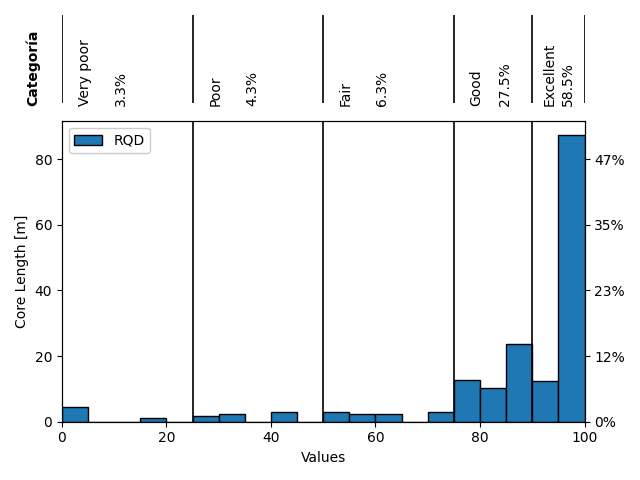
Using the filtered collection, we can easily generate histograms or other statistical views. In this example, we show a histogram of RQD values, but only for drillholes where FF is defined.
ff_drillholes.createParameterHistogram(parameter_id="RQD")
Total running time of the script: (0 minutes 2.709 seconds)